



Accessible social media content helps your posts reach wider audiences while improving clarity, usability, and engagement across platforms. This guide breaks down practical, creator-friendly best practices that make accessibility an integral part of everyday content creation.
Accessibility on social media has evolved into a measurable performance advantage. Content that accounts for how people actually consume information online, often without sound, at speed, and across devices, consistently performs better.
Much of this shift has been influenced by practitioners working inside social media ecosystems rather than outside them. Strategists such as Alexa Heinrich have helped translate accessibility principles into practical, platform-aware guidance that aligns with real-world content workflows. Her approach reinforces a simple truth: when content is clearer and more usable, engagement follows naturally.
Accessibility strengthens content by improving comprehension, reducing friction, and supporting a broader range of users without compromising creativity or brand voice.
Writing captions that support understanding
Captions are often the first and sometimes only layer of context users encounter. Clear caption writing supports screen readers, improves comprehension for users with cognitive or language-processing differences, and benefits anyone scrolling quickly.
Effective captions tend to:
- Use plain, direct language
- Present one idea per sentence
- Avoid slang, acronyms, and cultural shorthand
- Explain the action or purpose of visuals when relevant
Spacing plays a critical role. Line breaks reduce visual density and help readers process information on small screens. Capital letters should be used sparingly, as they reduce readability and interfere with assistive technologies.
Alt text as context, not decoration
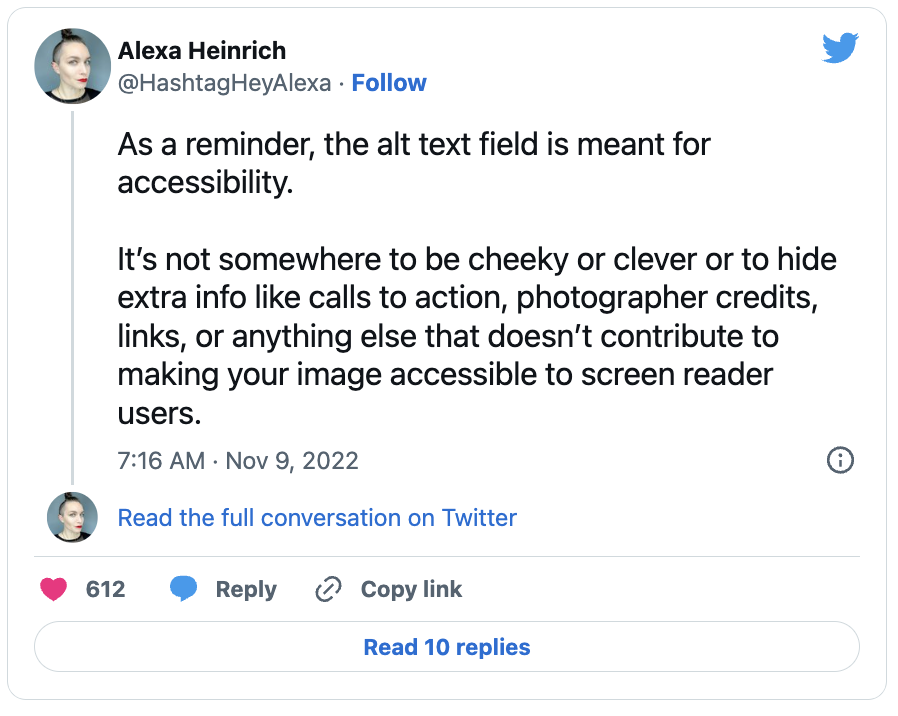
Alt text allows screen readers to describe images to users who cannot see them. When written well, it provides context rather than simply naming objects.
High-quality alt text focuses on meaning:
- What is the primary subject
- What is happening
- Why the image matters within the post
The table below illustrates the difference between vague and effective alt text.
| Image Type | Poor Alt Text | Effective Alt Text |
|---|---|---|
| Photo | Dog | Golden retriever catching a red ball in a city park |
| Infographic | Social media tips | Infographic outlining five accessibility best practices for social media |
Alt text also improves discoverability by helping platforms and search engines understand visual content more accurately.
Typography and readability in social posts
Fonts, spacing, and layout determine how easily content can be consumed. Accessible typography reduces strain and improves clarity for users with visual impairments or reading difficulties.
General guidelines for readable typography include:
| Font Type | Examples | Why It Works |
|---|---|---|
| Sans-serif | Arial, Helvetica, Verdana | Clean lines, strong legibility on screens |
| Serif | Georgia, Times New Roman | Readable at larger sizes, good for longer text |
Consistent font use across posts improves recognition and reduces cognitive load. Decorative or condensed fonts should be avoided in captions, graphics, and overlays.
Colour contrast and visual legibility
Low contrast remains one of the most common accessibility issues on social media. Text that blends into the background or overlays images can quickly become unreadable.
Strong contrast improves usability across a wide range of viewing conditions. The table below outlines common contrast outcomes.
| Text Colour | Background Colour | Accessibility Quality |
|---|---|---|
| Black | White | Excellent |
| Dark grey | Light grey | Good |
| Light grey | White | Poor |
| Yellow | White | Poor |
Colour should never be the only method used to convey meaning. Icons, labels, or text cues should reinforce key information.
Making video content accessible by default
Video content is frequently watched without sound, making captions essential for comprehension and engagement. Subtitles support deaf and hard-of-hearing users while also benefiting multilingual audiences and viewers in public spaces.
Effective captions are:
- Accurate and well-timed
- Written in clear, simple language
- Displayed with readable fonts and strong contrast
- Inclusive of relevant non-speech audio cues
Captions should be reviewed manually, even when generated automatically.
Using built-in platform accessibility tools
Most major social platforms provide accessibility features designed to support inclusive content creation. Using these tools intentionally improves usability and audience reach.
| Tool | Purpose | Benefit |
|---|---|---|
| Alt Text | Describes images | Improves understanding for visually impaired users |
| Captions | Displays video audio as text | Helps deaf or hard-of-hearing users |
| Screen Reader Support | Ensures content reads aloud correctly | Enhances navigation for all users |
Always check platform updates to ensure new accessibility tools are being used effectively, as features and requirements evolve regularly.
Learning through community insight
Accessibility improves fastest when creators listen to people who rely on it daily. Engagement with disability advocates and accessibility-focused communities provides practical insight that analytics alone cannot deliver.
This engagement helps creators:
- Identify overlooked barriers
- Improve content clarity
- Stay aligned with emerging best practices
An accessibility-first mindset treats feedback as an opportunity to refine, not a critique to resist.
Testing, review, and ongoing improvement
Accessibility requires regular evaluation. Platform updates, design trends, and new formats can introduce unintentional barriers.
A basic accessibility review typically includes:
| Area | What to Check |
|---|---|
| Images | Alt text presence and accuracy |
| Text | Contrast, font size, spacing |
| Video | Caption accuracy and timing |
| Navigation | Screen reader and keyboard usability |
Routine audits ensure content remains usable and inclusive over time.
Designing content that holds attention
Accessible social media content creates clarity, builds trust, and strengthens engagement. When posts are easier to process, audiences stay longer, interact more confidently, and share more readily.
Accessibility-first social media strategy has helped reposition inclusion as a creative discipline rather than a technical obligation. Clear writing, thoughtful visuals, and intentional design improve content quality across the board.
Designing for everyone sharpens communication. It forces creators to be more deliberate, more precise, and more aware of how their content is experienced. In an increasingly crowded digital landscape, that clarity remains one of the most reliable drivers of meaningful engagement.
Learn more on Accessible-Social.com